Withdraw
Send SOL from your funding wallet to any address.
A withdrawal sends SOL from your funding wallet to an address you choose, for example your own wallet or an exchange. To bring SOL back from your buyer wallets first, see Fund and withdraw buyer wallets.
Press Withdraw
On the funding wallet card in Wallets. It is grey while the funding wallet is empty.
Enter the address and the amount
With Direct picked, paste the address under Send to address. Then pick Everything (the whole balance, less the network fee) or Set amount (exactly this much; the rest stays).
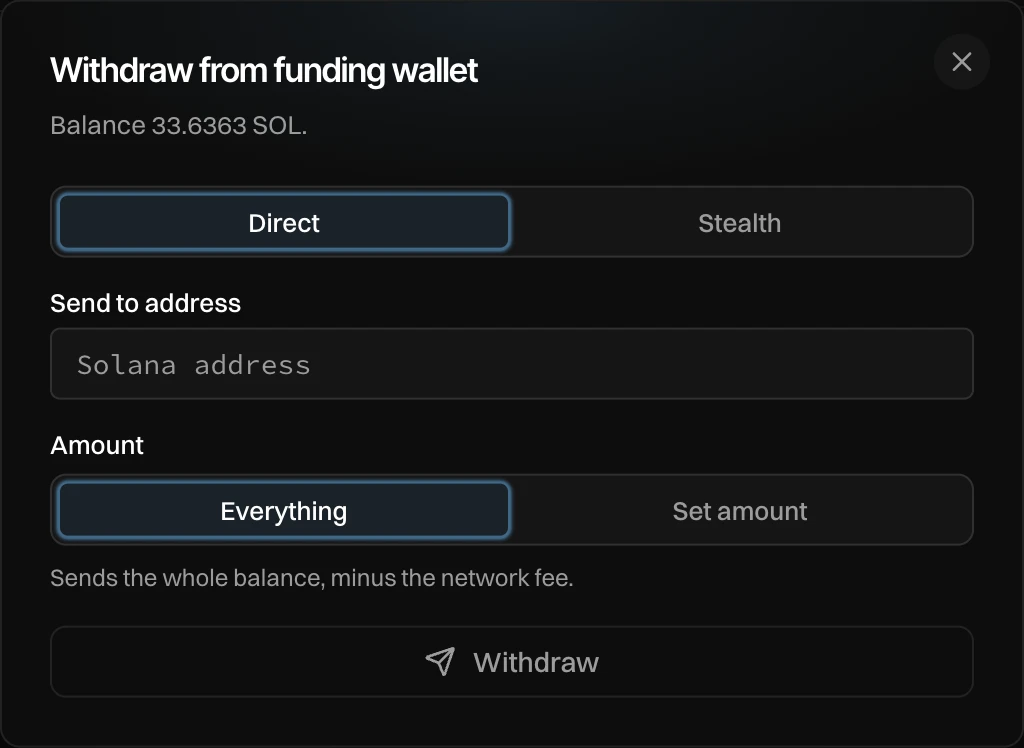
Press Withdraw and enter the email code
Newport sends a code to your email before money leaves for an address outside Newport. Enter it, and the SOL is sent.
Check the address. A withdrawal cannot be undone. Only send to a Solana address.
A direct withdrawal links your funding wallet to the address you send to. To leave no link, pick Stealth instead: see Stealth withdraw.
Messages you can see
| Message | What to do |
|---|---|
| Amount must be between 0 and … SOL | Enter an amount up to your balance. |
| Invalid destination address. Must be a valid Solana address. | Check the address you pasted. |
| Nothing to withdraw: the balance does not cover the fee | The funding wallet holds too little to pay the network fee. |
| Cancelled. Enter the code from your email to continue. | You closed the email code window. Press Withdraw again. |