Strategies
Strategies trade for you, even with the page closed.
A strategy trades your token for you. You tell it what to do, for example sell a share of every outside buy, and Newport's server does it, even when the page is closed or your computer is off. Strategies live under the Trade panel on the live page.
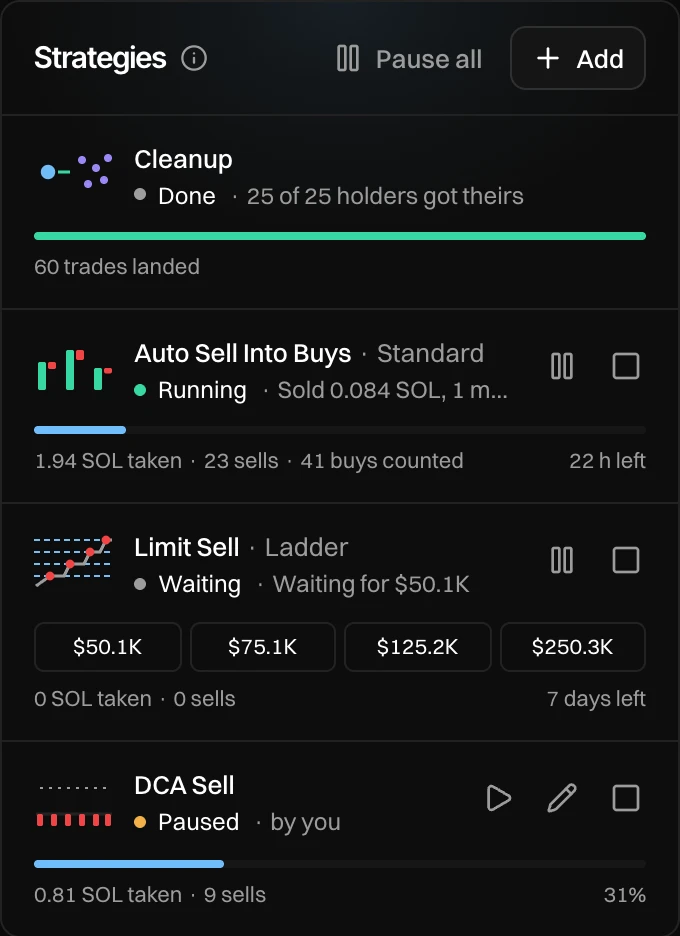
- Pause all (when two or more run) and Add.
- Cleanup, when your launch has it. It runs by itself after launch. See Cleanup.
- A running strategy: what it has taken, how many trades, and the time left.
- A strategy waiting for its market cap. A Limit Order shows its levels, with ✓ on each one done.
- A paused strategy.
The three kinds
Each kind sells or buys.
| Kind | Sell | Buy | Best for |
|---|---|---|---|
| Counter Trade | Auto Sell Into Buys | Auto Buy Into Sells | Selling into demand without pushing the price down. |
| DCA | DCA Sell | DCA Buy | Selling or buying slowly, over hours. |
| Limit Order | Limit Sell | Limit Buy | Taking profit or buying the dip at market caps you choose. |
Press Add
Press Add in the Strategies panel. It waits for the first trade the page sees, then turns on.
Pick what it does
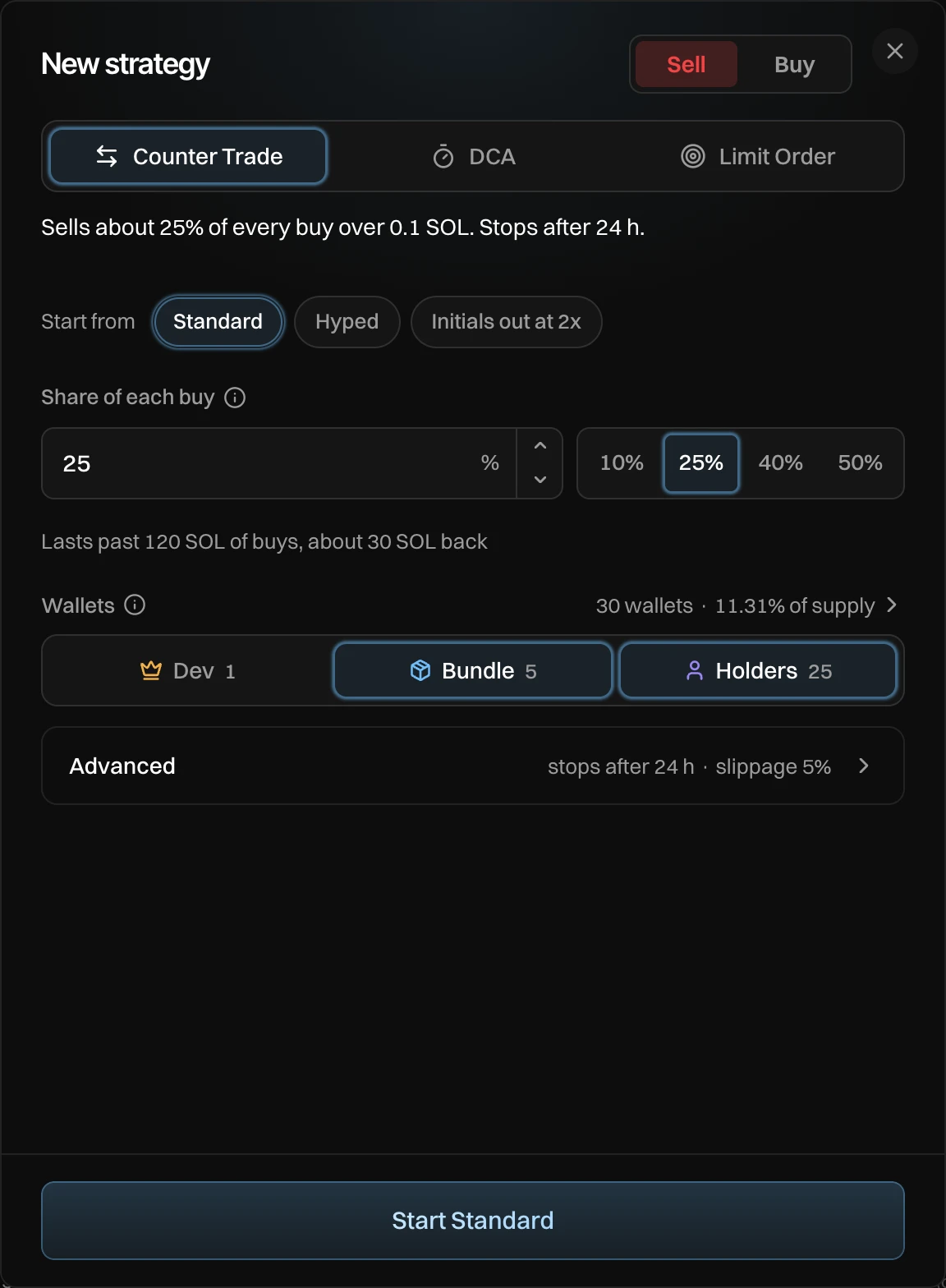
- Sell or Buy.
- The kind: Counter Trade, DCA or Limit Order.
- One sentence says what it will do. It changes as you change the values.
- Start from: ready-made settings. See Presets.
- The one or two numbers that matter, with one-tap values beside them.
- What those numbers add up to on this token right now.
- Wallets: which wallets it trades from. Press the line on the right to pick them one by one.
- Advanced: limits and fine tuning, with what is set shown on the line.
- Start.
Switching between kinds, or between Sell and Buy, keeps what you typed in each.
Start it
Press Start, then press again on the button that names the most it can do, for example Confirm: sell up to 11.31% of supply or Confirm: spend up to 1 SOL.
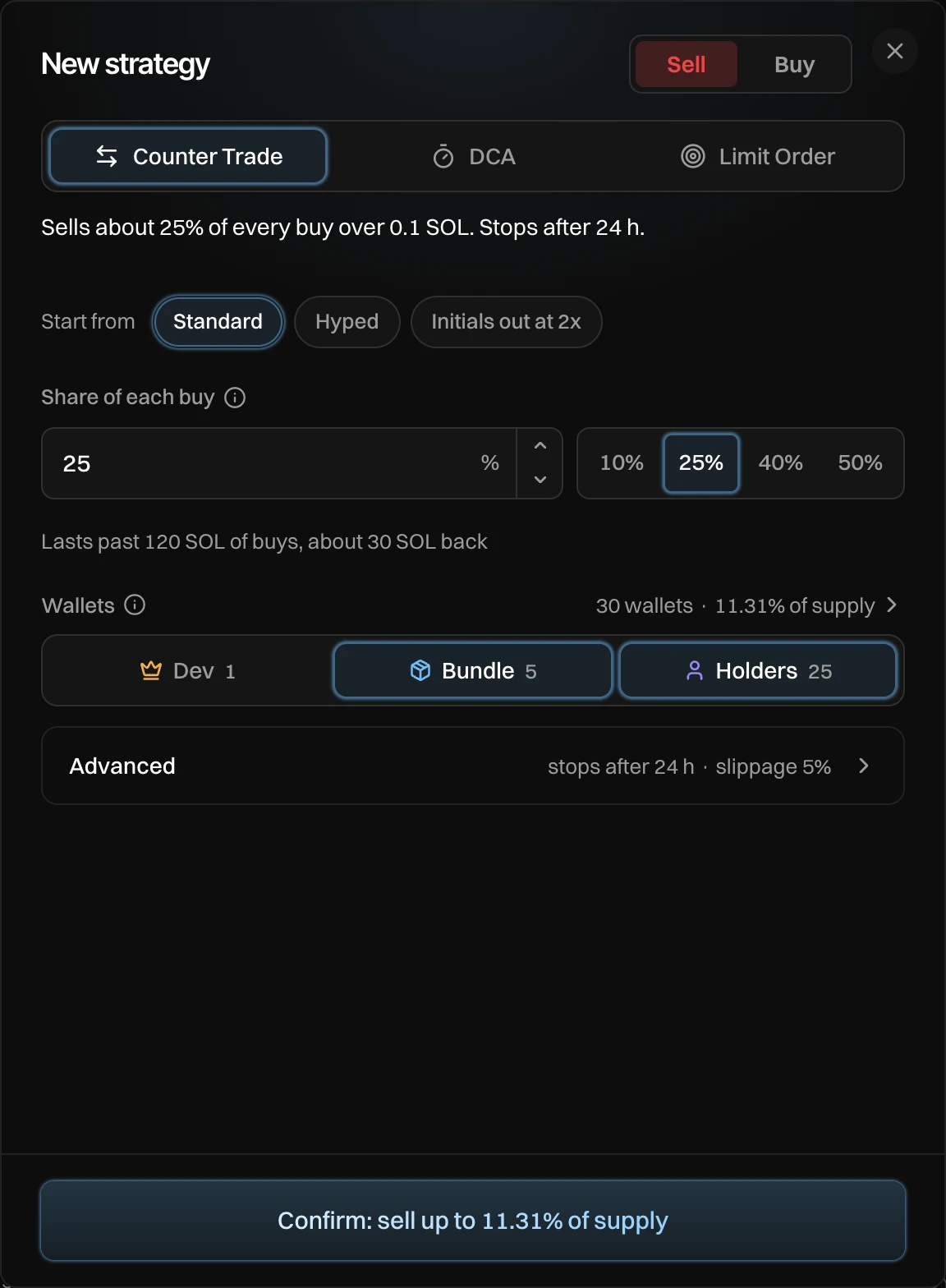
You see "Standard started", and the strategy shows in the panel.
Status and controls
| Status | What it means |
|---|---|
| Running | It trades when its conditions are met. The line shows its last trade, or "Ready to sell". |
| Waiting | Running, but its market cap is not reached yet, for example "Waiting for $50K" or "Waiting: under your average cost". |
| Paused | It does nothing until you resume it. |
| Done | It finished what it was set to do. |
| Stopped | It ended early. The line says why. |
- Pause and Resume (▶) stop and restart it.
- Edit (✎) shows on a paused strategy. Change any value and press Save and resume.
- Stop (■), then Stop it within 3 seconds, ends it for good.
At most 5 strategies run or wait paused on one token. Finished ones stay in the list a while: the newest three.
Why a strategy paused or stopped
| The line says | Why |
|---|---|
| by you | You paused it. |
| you sold everything | You pressed NUKE, or sold 100%. Strategies pause first, so none holds a wallet the sell needs. |
| you withdrew | You pressed Withdraw all to funding wallet. |
| the launch was archived | You archived the launch. |
| Stopped by you | You stopped it. |
| Budget spent | A buy spent all of its budget. |
| Sold | A sell has nothing left to sell. |
| Ended after 24 hours | Its time ran out. |
Every trade a strategy makes shows in the Auto tab under the chart. See Txs, Wallets, Holders and Auto.
You can also set up a sell strategy before launch, under After launch. It starts by itself once your buys, and Cleanup if you have it, are done.
Messages you can see
| Message | What to do |
|---|---|
| At most 5 run on one token | Stop one before you add another. |
| Waiting for the market | Add turns on with the first trade the page sees. |
| None of your wallets holds this token | A sell needs a wallet with tokens. Buy first, or pick Buy. |
| None of your wallets has SOL | A buy needs a wallet with SOL. Fund your wallets first. |
| Could not change it. Try again. | Pause, resume or stop did not go through. Press it again. |