Run your group
Follow the raise, lock the group, launch, sell for everyone and pay out.
Once your group is open, its panel in Launch settings is where you run it: share the link, watch members pay in, and lock it. After launch, the same panel moves to the live page, where you sell for the group. Every sell is paid out to the members right after.
Before you start
- An open group. See Open a group.
Share the link
At the top of the panel is the group's link. Send it to the people you want in, with Join a group so they know what to do.
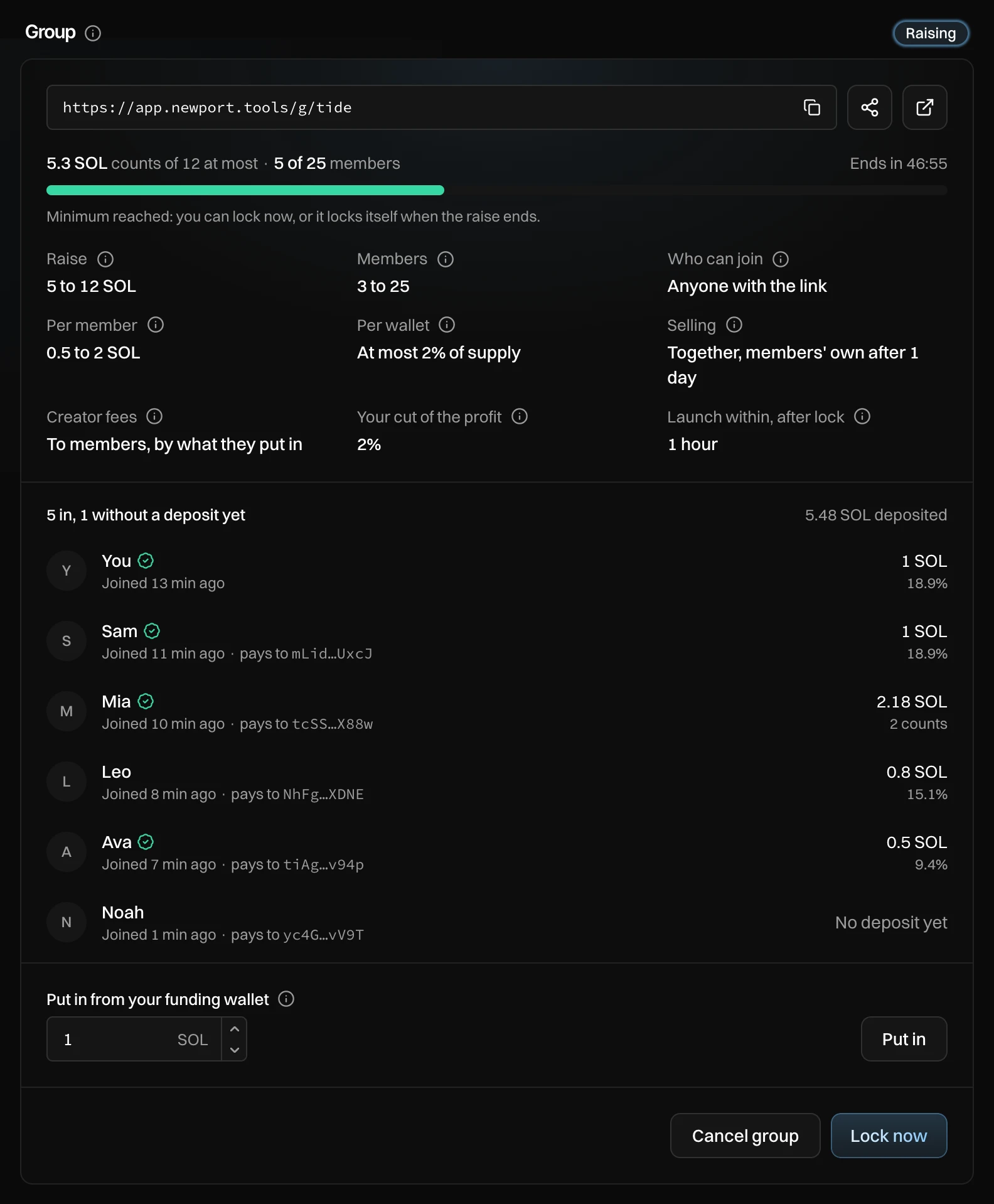
- The link. Press it to copy it. The buttons next to it share it and open the members' page.
- The raise: what counts so far, how many members, and the time left. The bar turns green once the minimum is in.
- The members, with what each sent and their share.
- Put in: add your own SOL from your funding wallet.
- Cancel group and Lock now.
Follow the raise
The panel updates by itself. Each member shows their name, a check mark when their wallet proved their return address, when they joined, and where they are paid.
| Under the amount | What it means |
|---|---|
| A percentage | Their share of the pool if it locked now. |
| No deposit yet | They joined but have not sent SOL. |
| 2 counts | They sent more than the most per member. Only this much counts; the rest goes back at lock. |
| Not counted | Their deposit is under the least per member, or the raise was already full. It goes back. |
Under the bar you see what is still missing, for example "1.2 SOL to the minimum of 5, 1 more member needed".
Put in your own SOL
To add SOL of your own, enter an amount under Put in from your funding wallet and press Put in. Press again on Send 1 SOL into the group to confirm. Your SOL counts like anyone's, with the same limits per member.
Lock the group
Once the minimum is in and enough members count, press Lock now, then Lock with 5.3 SOL to confirm. You don't have to: the group also locks by itself when the raise ends, when it reaches its maximum, or when it reaches its max members.
At lock, each deposit moves into the group's pool, and anything over a member's limit goes back to them. Nobody can join or leave after this. You see "Locked. Launch within 1 hour with all of the pool."
Launch
The badge now shows Locked, launch within and a countdown. Launch settings shows Buys, Wallets and Funding, all set by the group.
- Create the launch wallets under Wallets.
- Fund them from the pool under Funding. A pool funds its wallets directly.
- Press Create, then launch as usual. See Launch day.
Launch is refused until all of the pool is in the launch wallets, so every member's SOL buys.
If you don't launch before the countdown ends, the group is cancelled and everyone is refunded.
Sell for the group
On the live page, the group's panel takes the place of Trade and Strategies. A group's wallets trade only from here, all together.
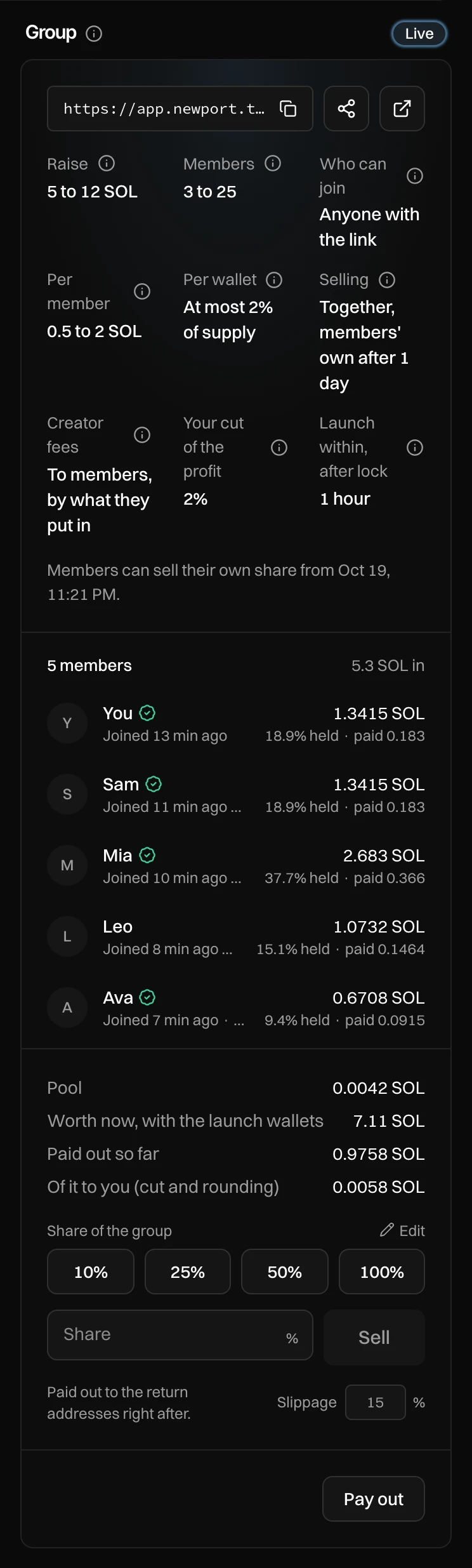
- Each member's part: what it is worth now, the share of the group's tokens they hold, and what has been paid to them.
- The pool, what the group is worth now with the launch wallets, and what has been paid out so far.
- Share of the group: press a share, then press again to confirm. Or enter your own share and press Sell.
- Pay out.
What a sell brings in goes to the members' return addresses right after it, by share, less your cut of their profit. You see, for example, "Sold 25% of the group. Paid out 1.6 SOL."
Once members can sell their own share too, a switch shows The group and Your share: pick Your share to sell only your own part. With Each their own, you sell only your own share, like every member.
Pay out
Each sell pays out by itself. Pay out runs a payout now: press it when a message says a payout did not land. When everything is sold and paid out, the badge shows Paid out.
If creator fees go to members, every payout also pays out the creator fees, and they keep being paid once a day after the last one.
Cancel the group
Press Cancel group while the group is raising or locked, before launch. Press again to confirm.
- While raising: "Yes, cancel the group". Every deposit goes back to its return address.
- Once locked: "Yes, refund 5.3 SOL". What went into the launch wallets comes back to the pool first, then every member gets back exactly what they put in.
The group's link keeps working, so members can see their refund.
Messages you can see
| Message | What to do |
|---|---|
| This launch is set up as a group. Open the group and lock it first. | Open the group, then lock it once members have paid in. |
| This launch has a group. Lock it (or cancel it) first. | Lock the group before you launch. |
| 0.0123 SOL of the group is still in its pool. Fund the wallets in the checklist, then launch. | Fund the launch wallets under Funding. |
| Lock has not finished. Press Lock again. | Press Finish lock. Lock picks up where it stopped. |
| A payout did not land. Press Pay out again. | Press Pay out. Nothing is paid twice. |
| This group is busy. Try again in a minute. | Another action on the group is running. Wait and try again. |
| Nothing left to sell | The group holds no tokens any more. |