Privacy Swap
Swap any coin to any coin on newport.tools, with no link between the two.
Privacy Swap changes one coin into another, for example SOL into ETH, across their networks. What you get arrives from a busy payout wallet, never from the wallet you sent from, so nobody can follow the coins from one to the other. It is free to open, needs no account and no sign-in, and works with SOL, BTC, ETH, USDC, XMR and 180 more coins.
Open it at newport.tools/swap.
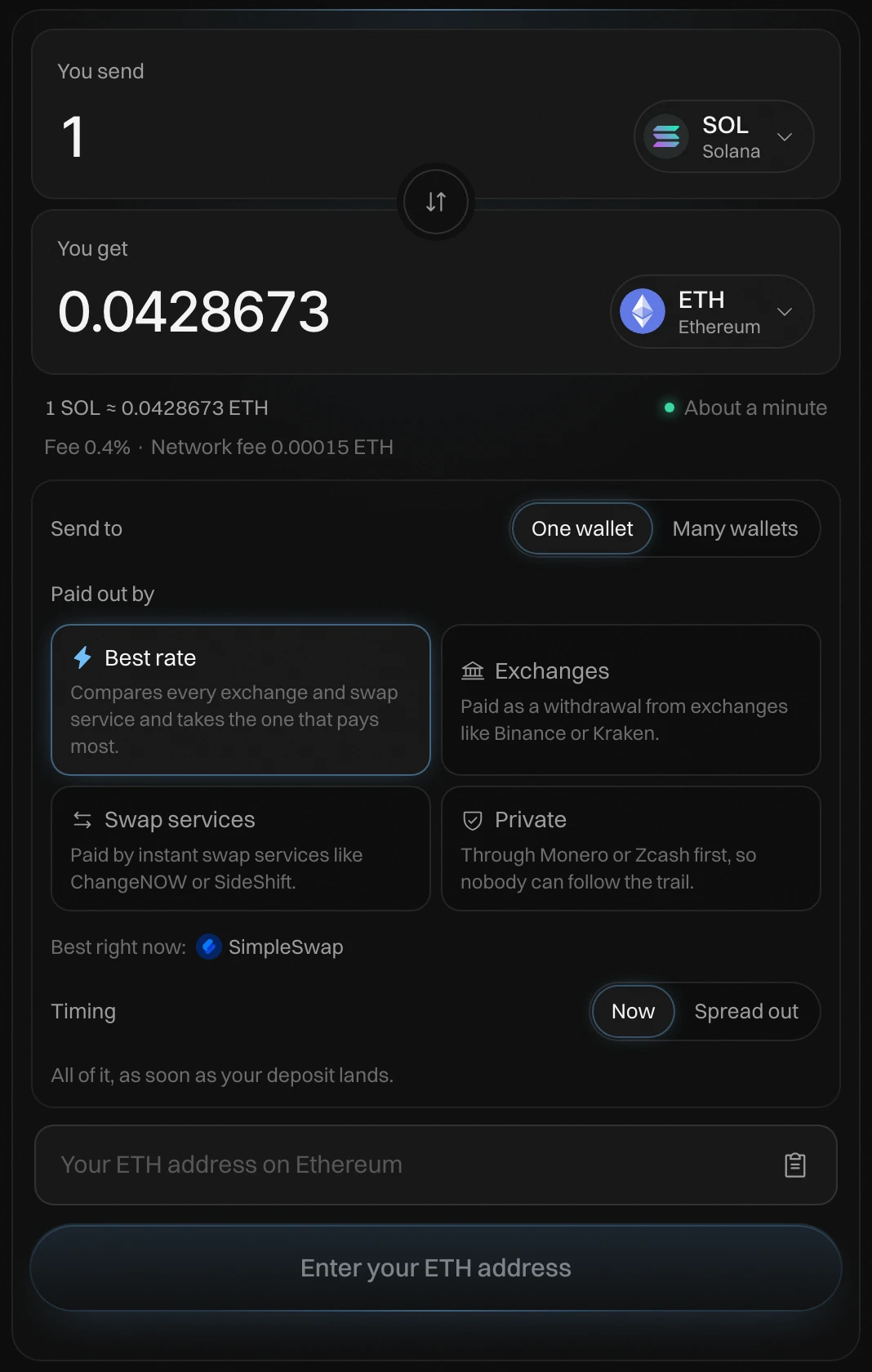
- You send and You get: the coins and amounts. The ⇅ button switches them.
- The rate, how long it takes, the fee and the network fee. What you see is what arrives.
- Send to: One wallet, or Many wallets to split it.
- Paid out by: who sends you the coins.
- Timing: Now, or Spread out.
- Your address, where the coins go.
Pick the coins and the amount
Under You send, pick the coin and type the amount. Under You get, pick the coin you want. Each coin shows its network, for example USDC on Solana or on Ethereum. Search by name or network.
Choose who pays you out
| Paid out by | How your coins arrive |
|---|---|
| Best rate | Compares every exchange and swap service and uses the one that pays most. |
| Exchanges | As a withdrawal from exchanges like Binance or Kraken, from a busy payout wallet. |
| Swap services | From instant swap services like ChangeNOW or SideShift, each from its own wallets. |
| Private | Swapped through Monero or Zcash first, so nobody can follow the trail. Then an exchange you pick pays you. |
Best right now shows which one Best rate picked.
Choose where and when
- One wallet: paste your address.
- Many wallets: paste up to 50 addresses, one per line. Amounts splits it Even or Uneven.
- Timing: Now sends all of it as soon as your deposit lands. Spread out pays at random times over 15 minutes, 1 hour, 4 hours or 24 hours.
Add a memo or tag if your wallet or exchange needs one. Add a refund address says where your deposit goes back to if the swap can't go through.
Start the swap and send
Press Start a swap. The page shows Send exactly an amount, and the deposit address. Send exactly that amount, on that network. The page follows the swap:
Waiting for your deposit · Deposit received · Swapping (or Swapping through Monero) · Sending to you (or Paying out) · Done
Keep the swap's link: it brings you back to the page. Press Copy link to this swap to keep it.
Send exactly the amount shown, on the network shown. A deposit on another network can't be swapped.
Messages you can see
| Message | What to do |
|---|---|
| Minimum ... Use it | The amount is under what the swap takes. Press Use it to send the minimum. |
| No payer takes this size. Send more. | Raise the amount. |
| Swap services can pay a little under their quote on small amounts. | Expect a little less, or pick Exchanges. |
| This swap expired | No deposit arrived in time, so nothing was swapped. Start a new one. |
| Your deposit is going back | The swap could not go through. It returns to the refund address. |
| Swap is not available right now. Try again in a few minutes. | Try again later. |
Stuck? Message @newported on Telegram with the swap's id.