Overview and P&L
See how your launches did today, this week, this month or in total.
Overview is your home screen. It adds up the profit of every launch, shows your funding wallet and buyer wallets, and lists your launches. Open it from the sidebar, or press the Newport logo.
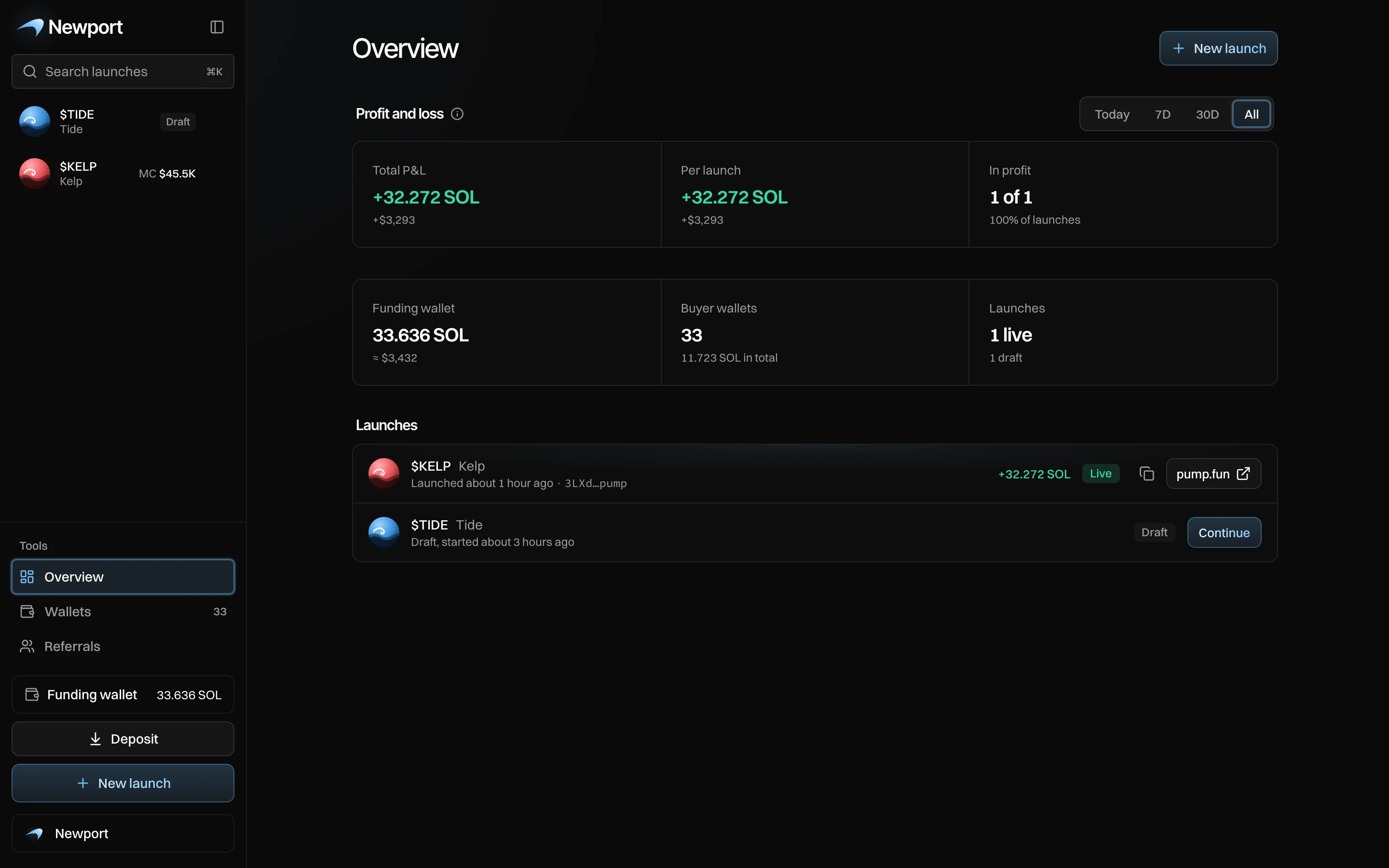
- The period: Today, 7D, 30D or All.
- Profit and loss for that period.
- Your funding wallet, buyer wallets and launches. Press the first two to open Wallets.
- Your launches: live ones first, then drafts.
- A live launch's profit, with buttons to copy its token address and open it on pump.fun.
Profit and loss
| Figure | What it shows |
|---|---|
| Total P&L | The profit of every launch in the period added up, in SOL, with dollars under it. |
| Per launch | The average profit per launch. |
| In profit | How many of those launches are in profit, for example "1 of 1". |
A launch counts in the period of the day its token launched. Today starts at midnight where you are. Archived launches count too. The section shows once you have launched a token.
What P&L counts
Each launch's profit is the same Total P&L its live page shows:
- plus what your wallets sold, and what they still hold if sold now;
- plus creator fees earned, once they reach your dev wallet;
- minus what your wallets bought, and every cost: pump.fun's fees, network fees, bundle tips, the token's create cost and the fees.
The network fees for funding your wallets and withdrawing are not counted.
For example, Kelp shows +32.272 SOL. With only one launch, Per launch is the same, and In profit is 1 of 1.
Your launches
Each row shows the token, when it launched (or "Draft, started 3 hours ago"), its profit and a Live or Draft tag.
- Press a row to open it.
- On a live launch, copy its token address or open it on pump.fun.
- On a draft, press Continue to carry on where you left off.
Archived launches don't show here. Find them under Archived in the sidebar. See Find your way around.
Messages you can see
| Message | What it means |
|---|---|
| No launches in this period | None of your tokens launched in this period. Pick a longer one. |
| No launches yet | Start one with New launch. |
| Every launch is archived | Find them under Archived in the sidebar. |