Create wallets and groups
Create buyer wallets in bulk and keep them in named groups.
Launch settings creates the wallets each launch needs, so you rarely need this page. Create wallets yourself when you want a ready set, for example to fund many wallets before you plan a launch, or to keep one group of wallets per launch.
Press Create wallets
At the top of Wallets.
Choose how many
Type a number from 1 to 500, or press 10, 20, 50, 100 or 200.
Add them to a group (optional)
Switch on Add to a group, type a group name (up to 40 characters) and pick a colour. Wallets in a group stay together. Wallets without a group can be used by any launch.
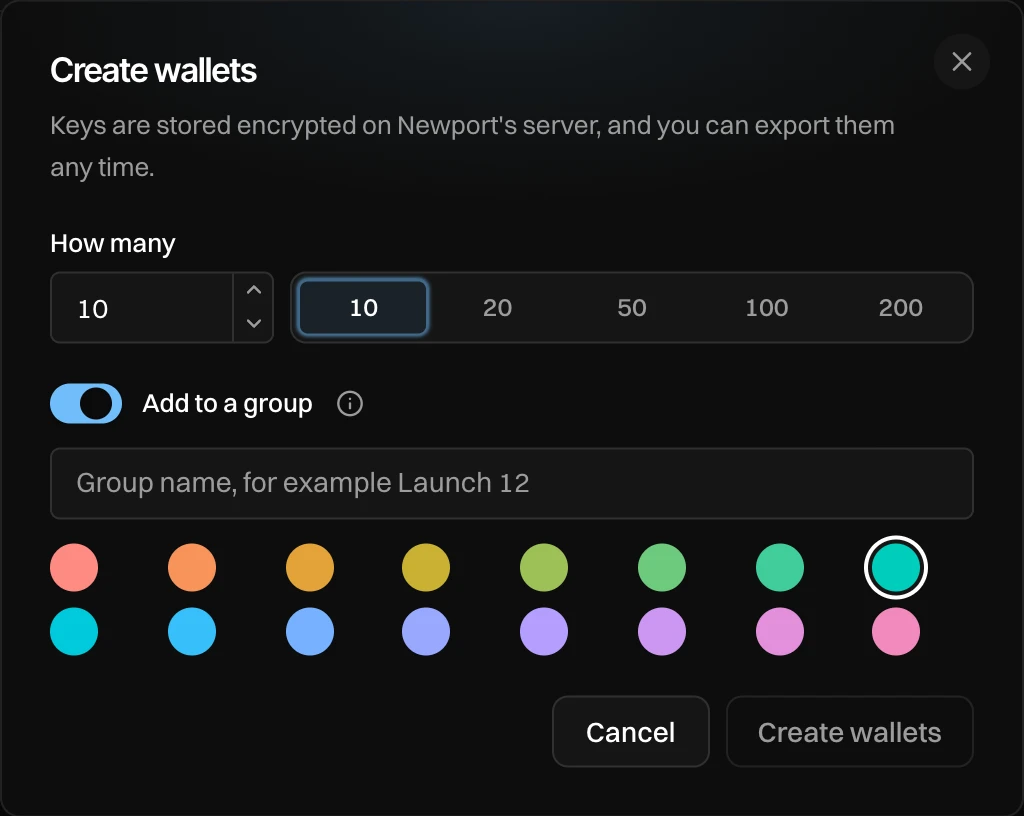
- How many.
- Add to a group.
- The group's name and colour.
Press Create wallets
You see "Created 10 wallets in "Launch 12"". Creating wallets is free: nothing is sent.
Groups on the Wallets page
On the left of Wallets (a row of chips on a phone): All wallets, Ungrouped, then each group with how many wallets it has. Pick one to see only its wallets. Press a group's folder icon to change its colour, and New group to create wallets straight into a new group.
When you plan a launch, Review under Wallets lets you use one group's wallets for its buys. See Wallets for a launch.
Good to know
- Wallets are never deleted. An account can have up to 1,000 wallets.
- Keys are stored encrypted on Newport's server, and you can export them any time.