Limit Order
Sell or buy at the market caps you choose, with a stop loss if you want one.
A Limit Order trades at market caps you choose. Limit Sell takes profit in steps as the price climbs, and can sell everything left if it falls below a stop loss. Limit Buy buys at lower market caps, to catch a dip. Each step is a level, and you can set up to 8.
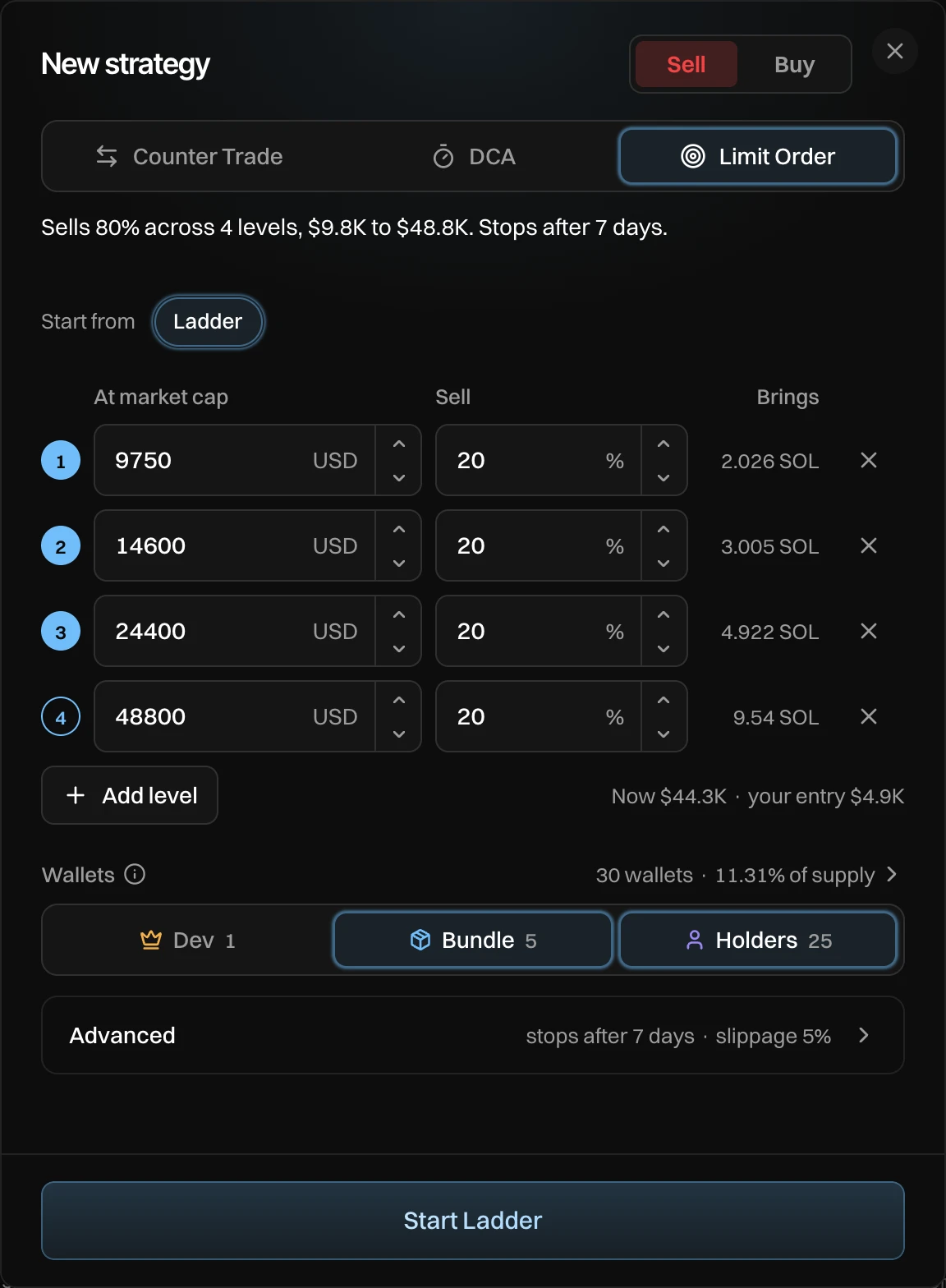
Set your levels
Press Add, pick Sell or Buy, then Limit Order. Each row is one level:
| Column | Limit Sell | Limit Buy |
|---|---|---|
| At market cap | Sells once the market cap is at or above this. | Buys once the market cap is at or below this. |
| Sell / Buy | A share of the tokens your wallets held when it started. | SOL to spend at this level. |
| Brings / Gets | What that level would bring in SOL, or the share of supply it would get. |
- Add level adds a row at a higher market cap (for a sell) or a lower one (for a buy). ✕ removes a row.
- Under the rows: the market cap now and, for a sell, your entry (the average market cap your wallets bought at).
- A level's number fills in when the market cap is already past it: that level trades as soon as the strategy starts.
A new Limit Sell starts with one level: 50% at twice your entry. A new Limit Buy starts with 0.5 SOL at 70% of the market cap now. A Limit Buy's budget is the sum of its levels.
How it trades
While the market cap is past a level, the strategy trades that level in slices of at most 2% price impact. If the price comes back before a level is done, the rest waits for it to cross again. In the Strategies panel each level shows its market cap, fills up as it trades, and gets a ✓ when done. On the chart, each level shows as a dashed line.
For example, Kelp's entry is $4.9K. Ladder sells 20% each at 2x, 3x, 5x and 10x: $9.8K, $14.6K, $24.4K and $48.8K. The market cap is $44.3K, so the first three levels are already past and sell as soon as it starts. The fourth waits for $48.8K.
Stop loss
On a Limit Sell, turn on Stop loss under Advanced and set a market cap. If the market cap falls below it, the strategy sells everything it has left, at a wider slippage (Stop loss slippage, 20% by default) so the sell fills.
A stop loss sells at whatever the market pays once it triggers. In a fast drop, that can be well under the stop market cap.
Settings
| Setting | What it does | Default |
|---|---|---|
| Levels | Market cap and amount per level. | Sell: 50% at 2x your entry. Buy: 0.5 SOL at 70% of now. |
| Stop loss | Limit Sell: sells everything left below this market cap. | Off |
| Stop loss slippage | The slippage for the stop loss sell. | 20% |
| Stops after | When it ends. | 7 days |
| Most price impact | Bigger trades are split. | 2% |
| Slippage | How far the price can move before a trade gives up. | 5% |
Messages you can see
| Message | What to do |
|---|---|
| Add a level | A Limit Order needs at least one level. |
| The levels add up to more than 100% | A Limit Sell's levels sell at most all your tokens. Lower some. |
| The levels add up to more than the budget | Lower the SOL of some levels. |